The short answer: the most useful AI for a small nonprofit is not a chatbot on your website or a model that predicts who will give. It is AI that learns from what your stakeholders and participants already tell you (funders, board, volunteers, program participants) and turns it into evidence you can search, cite in a grant report, and act on. The seven uses below need your calls, notes and survey answers, a contact list and one person who owns follow-through. They do not need a data team, a data warehouse, or a new donor database.
UpSight, the tool I build, does this side of the work. It is customer intelligence for small teams (and agents): it learns from every conversation, survey and email, and keeps a living profile of every funder, donor, volunteer and participant. It is not a donor-management or gift-processing system: it does not take payments, issue receipts, or produce tax acknowledgments. Keep your donor database for gifts. Every use below also has a consent or privacy question attached, which I have put next to it rather than in a footnote.
What "AI" means here
Most nonprofit AI advice covers three things: writing help (appeals, grant narratives), prediction (who is likely to give or lapse), and automation (chatbots, scheduling). Writing help is already in everyone's hands. Prediction needs clean, large datasets that most small organizations do not have. Automation is a procurement project.
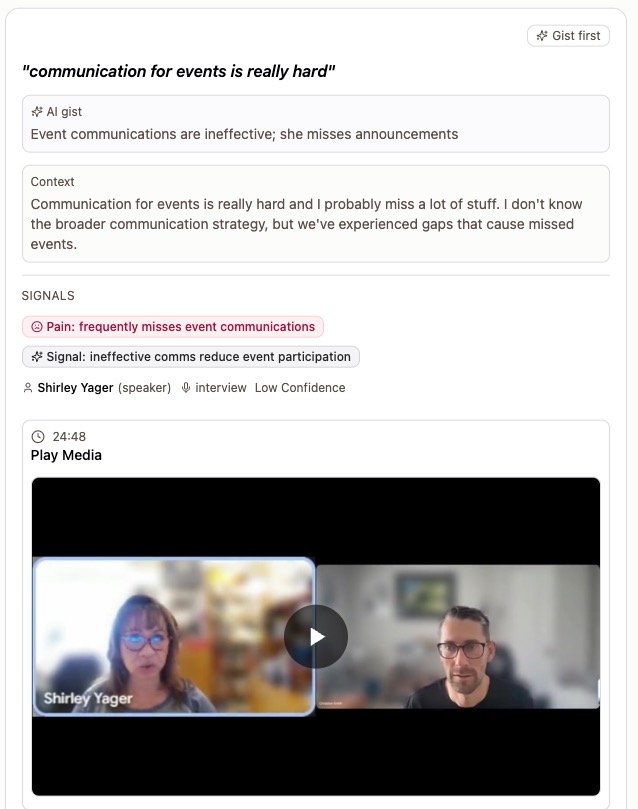
The seven uses below are a fourth kind. The AI builds a living profile of each person, drafts a brief before each meeting and the follow-up after it, and clusters what many people said into patterns. Every insight carries the quote behind it, with who said it and when. Everything downstream, from a grant report to a board memo to a lapsed-donor email, can then point to a quote instead of a recollection. We call that a receipt.
1. Turn funder calls into a record you can quote back
A program officer says on a call in March that the foundation is "moving toward early childhood next cycle" and asks for outcomes data by May. In September, when you write the renewal, that call lives in one person's memory, if that person is still on staff.
Add the call (with consent), your notes and the follow-up emails to the funder's profile, and pull out the key statements. The renewal then opens with what they asked for, in their words, and shows how you responded.
What you need: calls from Zoom, Google Meet or Microsoft Teams, plus your notes and emails, in a tool that keeps them on one profile. Consent: ask at the top of every call and record the answer. Recording-consent laws vary by state and country; asking every time keeps you safe everywhere.
2. Turn participant interviews into grant-report evidence
The people you serve are your strongest evidence, and most of it sits in a folder of recordings or in notes nobody can search. Interview or survey participants about what changed for them, have AI pull the quotes and group them into themes across everyone you talked to, and keep every theme linked to the exact moment it came from.
Two habits make this hold up when a funder reads it. Count people, not quotes: five participants describing the same change is a pattern; one participant saying it five times is one data point. And spot-check a sample of quotes against the recording before anything goes into a report; how to analyze customer interview transcripts with AI shows how.
What you need: a dozen interviews, notes or survey responses per program. Consent and privacy: written consent for recording and for quoting, a clear choice about anonymity, and permissions in whatever tool you use so participant recordings are visible only to the staff who need them. Recordings of vulnerable people are the most sensitive data you hold.
3. Ask lapsed donors why they stopped before you email them
Most lapsed-donor outreach is a "we miss you" appeal sent to everyone on the list. It assumes one reason. There are many: a bad experience at an event, a change in finances, a move, a cause that stopped feeling urgent, a thank-you that never arrived.
Send a sample of lapsed donors a short personal ask instead of an appeal. UpSight's win-back template opens with five questions you can edit (swap "use us for" for "support" in the first one):
- "What first brought you to us — and what did you mainly use us for?"
- "What changed? Walk us through what led you to stop."
- "What was the single biggest reason you left?"
- "What could we have done better while you were with us?"
- "What would have to change for you to consider coming back?"
Respondents can answer in a form, in a typed chat with an AI interviewer that follows up, or by voice. Answers cluster into reasons, each backed by the quotes, and you write one message per reason instead of one appeal for all. The business version of this is in Win-back starts with a question; the donor version is the same motion with "donor" in place of "customer." See the win-back approach.
What you need: a CSV of lapsed donors with emails. Consent: this is a question, not an ask for money. Say so in the first line, and honor every do-not-contact flag.
4. Keep volunteer and board feedback after the people leave
Volunteer check-ins and board conversations are where you hear "I might step back next year" or "the gala format is wearing thin" six months before it becomes a problem. Short periodic asks, three questions and no login, plus the occasional recorded one-on-one, give you a running record. Themes across responses show what is building; the quote behind each theme shows who said it and when.
What you need: a list and a quarterly cadence. Privacy: board and volunteer comments can be candid about staff. Decide who sees them before you collect them.
5. Walk into the donor lunch briefed
Before a meeting with a major donor, a foundation, or a board member, ask the tool to prep you. In UpSight, a brief before the meeting pulls past conversations, goals, open items and notes, and gives you who you are meeting, what is at stake, and three to five questions worth asking, each with a one-line why. Briefs adapt to the relationship; adding "donor lunch" to the request changes the lens.
What you need: uses 1 through 4 feeding the same profile. A brief is only as good as what is behind it.
6. Let AI draft the follow-up, and send it yourself
After the call, the thank-you and the "here is the data you asked for" email are the first things to slip. AI can draft them from the conversation. Whatever tool you use, drafts should be text, and nothing should reach a funder without a human reading it. In UpSight, most follow-ups are drafted for your approval; only a small set of ready-made templates can send on their own, and one project setting turns that off. You can also turn on email capture in settings, then BCC or forward emails to your capture address so the thread lands on the person's record.
7. Ask your AI assistant about your own evidence
If your team already uses Claude or ChatGPT, connect them to the evidence rather than pasting transcripts into a chat window. UpSight ships an MCP server, so you can ask "what have funders said about our evaluation approach this year?" or "which participants described a change in housing stability?" and get answers that cite the source moment. If the answer is not in the evidence, it says so instead of guessing. Read-only access is on the free plan; read and write on paid plans. See how the MCP server works.
Data handling: check what any assistant does with the data you connect, and check your own obligations before you connect participant data to anything.
What this does not do
None of the seven uses record a gift, run a payment, issue a receipt or generate a tax acknowledgment, and UpSight does not do those things. If a lapsed donor says "yes, I'd like to give again," that gift goes through your donation platform and your donor database, and the conversation that got you there lives next to it. CRM for nonprofits: what you need beyond a donor database covers how the two systems split the work.
Starting without a data team
- Pick one program and one funder relationship.
- Write a two-sentence consent script and use it on every call for a month.
- Add three conversations, with your notes, and read the themes against the original words. If you cannot click from a claim to the moment it was said, use a different tool.
- Decide who can see what before you add participant interviews.
- Add the lapsed-donor ask once the first three uses are working.
FAQ
Is AI safe to use with donor and participant data?
It can be, with three conditions: consent for recording and quoting, permissions so sensitive recordings are visible only to the staff who need them, and a vendor whose data handling you have read and can live with. Do not paste participant transcripts into a general chatbot. UpSight's practices are on its security page; read them before you connect anything.
Does UpSight replace our donor database?
No. UpSight does not process donations, store payment details, or issue tax receipts or acknowledgments. It holds the profiles, conversations and evidence around your stakeholders: funders, participants, volunteers and board. The donor database holds the gifts.
Do we need a data team or a data warehouse for any of this?
No. The seven uses run on your calls, notes and survey answers, a contact list exported as a CSV, and one person who owns the follow-through. Prediction models and dashboards need clean, large datasets; stakeholder evidence needs consent and a place to keep it.
Can AI write our grant reports?
It can draft from evidence you give it, and you own every claim in the draft. The test for any number or quote in a report is whether you can point to the source. Themes with linked quotes pass. A smooth paragraph with no trail does not.
Next step
Pick one funder and add your last call, your notes and the follow-up email to one profile. See how UpSight works for nonprofits, or start free.
Related reading
- Sibling article: CRM for Nonprofits: What You Need Beyond a Donor Database
- Landing pages: donor development, win-back, MCP server, pricing
- Landing page: UpSight for nonprofits
Know your customers and stakeholders. Serve them better.
UpSight keeps a living profile of everyone you talk to, from calls, notes, surveys and email. Every insight shows the quote behind it. Free to start, no card.
Start freeCommunities & nonprofits: Hear what members, volunteers and donors need. See how UpSight helps. Or browse everyone UpSight is for.